December 20, 2025
KMPShip pricing: a tier for every stage of your product journey
From free exploration to enterprise-grade infrastructure, KMPShip offers three tiers designed for every stage of product development. Discover which plan fits your current needs.
Posted by
 Vivien Mahé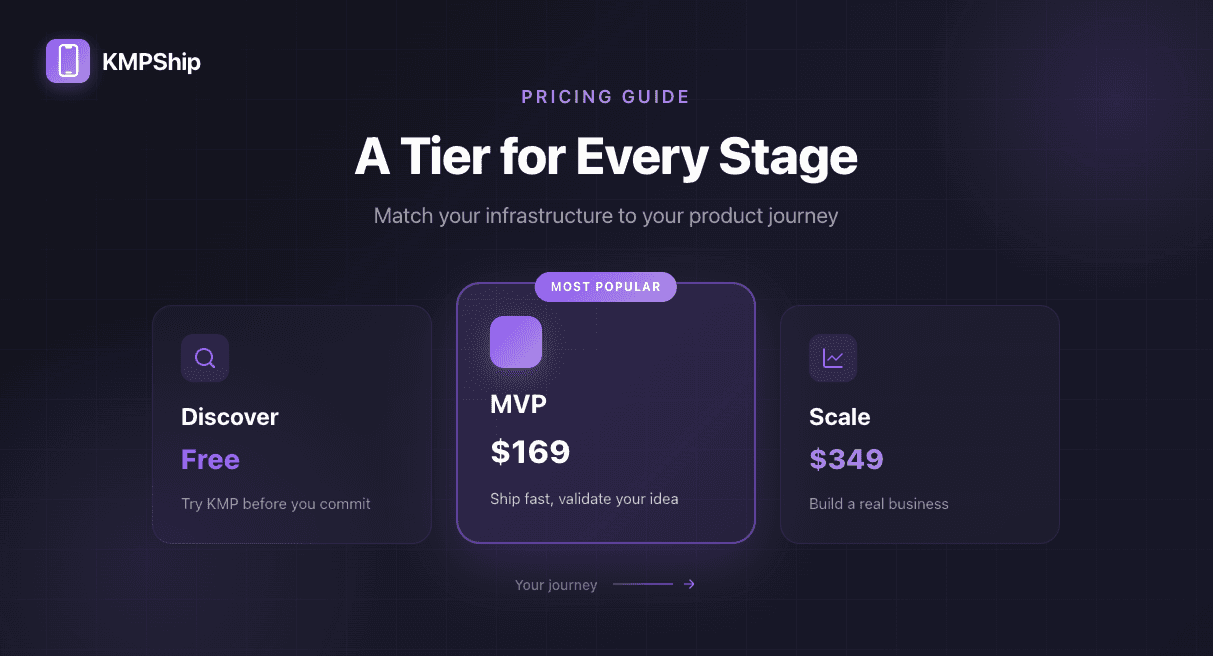
Why we built three tiers instead of one
When we first launched KMPShip, we had a single pricing tier. Customers either bought everything or nothing. Simple, right?
Wrong.
We heard the same feedback repeatedly:
- "I just want to try KMP before committing hundreds of dollars"
- "I need to ship an MVP fast, but don't need authentication yet"
- "We're building a real business and need the full infrastructure"
The problem was clear: developers have different needs at different stages of product development.
A solo developer validating an idea doesn't need the same infrastructure as a startup scaling to thousands of users. A team shipping their first MVP doesn't need in-app purchases on day one.
So we rebuilt our pricing from the ground up with one principle: match the tier to the stage, not the wallet.
🎯 Stage 1: Discover - try before you commit (Free)
Best for: Developers exploring KMP, students, proof-of-concept projects
You've heard about Kotlin Multiplatform. Maybe you've read about how Netflix, McDonald's, and Cash App use it in production. But you're not ready to spend hundreds of dollars before you even know if KMP works for you.
That's exactly why we created the Discover tier.
What you WON'T get (and why that's okay)
The Discover tier intentionally excludes backend integration, push notifications, and production-ready CI/CD. This keeps the codebase simple for learning and validation. Once you're ready to ship to real users, the MVP tier gives you everything needed for production.
What's included in Discover (Free)
- Basic project setup - KMP + Compose Multiplatform foundation
- Screen navigation - Multi-screen apps with proper navigation
- Dependency Injection - Clean architecture from day one
- Unlimited projects - Try it in as many projects as you want
Perfect for:
- Developers exploring KMP for the first time
- Teams evaluating whether to adopt multiplatform development
- Students and learners building portfolio projects
- Anyone who wants to validate the KMPShip approach before investing
What you can build with Discover
The Discover tier isn't a demo or a toy - it's a fully functional foundation. You can build:
- Multi-screen apps with proper navigation flows
- Local-only apps that don't need backend integration yet
- Proof-of-concept projects to validate your idea
- Learning projects to master KMP before your production app
Here's what the basic project structure looks like:
kotlin// Shared navigation graph across Android and iOS @Composable fun AppNavigation() { NavHost(startDestination = Screen.Home) { composable<Screen.Home> { HomeScreen( onNavigateToProfile = { navController.navigate(Screen.Profile) } ) } composable<Screen.Profile> { ProfileScreen( onNavigateBack = { navController.popBackStack() } ) } composable<Screen.Settings> { SettingsScreen( onNavigateBack = { navController.popBackStack() } ) } } } // Dependency injection with Koin val appModule = module { single { UserRepository(get()) } single { SettingsManager(get()) } viewModel { HomeViewModel(get()) } viewModel { ProfileViewModel(get()) } }
When you need more
You'll know it's time for MVP when you:
- ✅ Validated that KMP works for your use case
- ✅ Want to add backend API integration
- ✅ Need push notifications to engage users
- ✅ Are ready to ship to production
- ✅ Want CI/CD automation and professional support
🚀 Stage 2: MVP - ship fast, validate your idea ($169/£129/€149)
Best for: Solo founders, agencies building client MVPs, small teams validating market fit
You've validated your idea. You know KMP works for you. Now you need to ship a real product to real users and validate market fit.
This is where most products fail - not because the idea was bad, but because they spent too long building and ran out of time or money.
The MVP tier is designed for one thing: getting to market fast.
What you WON'T get (and when you'll need it)
MVP tier doesn't include user authentication, payment processing, or local database. These are intentionally excluded because most MVPs don't monetize on day one. When you validate market fit and need to scale, the Scale tier gives you production-grade infrastructure.
What's included in MVP (~75 hours saved)
Everything in Discover, plus:
- Onboarding & Settings flows - First-time user experience and account management
- Notifications (local & push) - Engage users with FCM and APNs already configured
- Design System - Professional UI components that work on both platforms
- HTTP Requests & API Calls - Ktor integration with error handling and retry logic
- Image Fetching - Efficient image loading and caching
- Lite Clean Architecture - Scalable code structure without over-engineering
- CI/CD pipeline - Automated builds and deployments with GitHub Actions + Fastlane
- Email & Discord support - Get unstuck fast when you need help
Perfect for:
- Solo founders shipping their first product
- Small teams validating market fit
- Agencies building MVPs for clients
- Companies pivoting to mobile-first
What you can build with MVP
This tier gives you everything needed for a production app that connects to your backend and engages users:
- Social apps - Feed-based apps with real-time updates
- Content apps - News, blogs, media streaming (without payments)
- Productivity apps - Task managers, note-taking, collaboration tools
- Community apps - Forums, groups, messaging
- Service marketplaces - Connect buyers and sellers (without payment processing)
Here's how the API integration looks:
kotlin// Shared API client across platforms class ApiClient(private val httpClient: HttpClient) { suspend fun fetchUserProfile(userId: String): Result<UserProfile> { return try { val response = httpClient.get("/users/$userId") Result.success(response.body()) } catch (e: Exception) { Result.failure(e) } } suspend fun updateProfile( userId: String, updates: ProfileUpdate ): Result<UserProfile> { return try { val response = httpClient.put("/users/$userId") { setBody(updates) } Result.success(response.body()) } catch (e: Exception) { Result.failure(e) } } } // Push notification handling (pre-configured) class NotificationManager( private val platform: Platform ) { suspend fun requestPermission(): Boolean { return when (platform) { Platform.Android -> requestAndroidPermission() Platform.iOS -> requestiOSPermission() } } suspend fun scheduleLocalNotification( title: String, message: String, delayMillis: Long ) { // Implementation already done for both platforms } }
The CI/CD pipeline that saves you weeks
Setting up CI/CD for both Android and iOS normally takes 1-2 weeks of configuration, testing, and debugging. With MVP tier, it's already done:
Automated workflows included
- Pull Request checks - Lint, test, and build verification
- Automated beta deployments - Push to TestFlight and Play Store Beta
- Production releases - One command to ship to both app stores
- Version management - Automated versioning and changelog generation
- Signing & certificates - All the painful configuration done for you
When you need Scale
You'll know Scale is right when you:
- ✅ Validated market fit and have paying users
- ✅ Need user authentication (Google, Apple, Email)
- ✅ Want to monetize with in-app purchases or subscriptions
- ✅ Need local database for offline functionality
- ✅ Require analytics to understand user behavior
- ✅ Want remote config to control features without app updates
💼 Stage 3: Scale - build a real business ($349/£259/€299)
Best for: Startups past product-market fit, revenue-generating apps, enterprise teams
You've shipped. You've validated. Users love your product. Now it's time to build a real business with enterprise-grade infrastructure.
The Scale tier isn't for startups trying to look big - it's for teams that are big or getting there fast.
When Scale might be overkill
If you're still validating your idea or don't have paying users yet, Scale's authentication and payment systems might add unnecessary complexity. Most successful products start with Discover or MVP tiers. That said, if you know you'll need these features from day one, Scale is the right choice.
What's included in Scale (122 hours saved)
Everything in MVP, plus:
- Authentication (Google, Apple, Email) - Complete auth flows with social login
- Payments (In-app purchases & subscriptions) - Monetize your app with RevenueCat integration
- Local Database - SQLDelight for offline-first architecture
- Remote Config - Control features and experiments without app updates
- In-App Reviews - Boost your app store ratings
- Analytics - Track user behavior and conversion funnels
- Full Clean Architecture - Enterprise-grade code structure
- Unit Tests setup - Testing infrastructure for reliable code
- Lifetime updates - Stay current with the latest KMP features forever
Perfect for:
- Startups scaling past product-market fit
- Companies building revenue-generating apps
- Teams that need enterprise-grade reliability
- Products with complex business logic and offline support
What you can build with Scale
This is the tier for serious businesses. You can build:
- SaaS mobile apps - Subscription-based business models
- E-commerce apps - In-app purchases with payment processing
- Fintech apps - Secure authentication and offline data sync
- Healthcare apps - Compliance-ready with local data storage
- Enterprise apps - Remote config for feature rollouts and A/B testing
- Premium content apps - Paywalls, subscriptions, and gated content
Authentication: the foundation of trust
Authentication is table stakes for serious apps. Scale tier includes everything you need:
kotlin// Complete authentication flow (already implemented) class AuthRepository( private val authService: AuthService, private val tokenStorage: TokenStorage ) { suspend fun signInWithGoogle(): Result<User> { return try { val credential = authService.getGoogleCredential() val response = authService.signInWithCredential(credential) tokenStorage.saveAuthToken(response.token) Result.success(response.user) } catch (e: Exception) { Result.failure(e) } } suspend fun signInWithApple(): Result<User> { // Apple Sign In already implemented } suspend fun signInWithEmail( email: String, password: String ): Result<User> { // Email/password auth already implemented } suspend fun signOut() { tokenStorage.clearAuthToken() } }
Payments: turn users into revenue
Monetization isn't an afterthought - it's a core feature. The payment system is production-ready:
Payment features included
- In-app purchases - One-time payments for premium features
- Subscriptions - Recurring revenue with auto-renewal
- Paywalls - Conversion-optimized UI components
- Receipt validation - Secure verification of purchases
- Restore purchases - Let users restore across devices
- RevenueCat integration - Cross-platform purchase management
kotlin// Payment handling (pre-configured) class PaymentManager( private val revenueCat: RevenueCat ) { suspend fun purchaseSubscription( packageId: String ): Result<PurchaseResult> { return try { val purchase = revenueCat.purchase(packageId) Result.success(purchase) } catch (e: Exception) { Result.failure(e) } } suspend fun getActiveSubscription(): Subscription? { val customerInfo = revenueCat.getCustomerInfo() return customerInfo.activeSubscriptions.firstOrNull() } suspend fun restorePurchases(): Result<CustomerInfo> { return try { val restored = revenueCat.restorePurchases() Result.success(restored) } catch (e: Exception) { Result.failure(e) } } }
Local database: offline-first architecture
Modern apps need to work offline. SQLDelight gives you type-safe database access across platforms:
kotlin// Type-safe database queries with SQLDelight class ArticleRepository( private val database: Database, private val api: ArticleApi ) { // Save articles locally for offline access suspend fun syncArticles() { val remoteArticles = api.fetchArticles() database.articleQueries.transaction { remoteArticles.forEach { article -> database.articleQueries.insertArticle( id = article.id, title = article.title, content = article.content, publishedAt = article.publishedAt ) } } } // Read from local database fun getArticles(): Flow<List<Article>> { return database.articleQueries .selectAll() .asFlow() .mapToList() } // Search works offline fun searchArticles(query: String): Flow<List<Article>> { return database.articleQueries .searchByTitle(query) .asFlow() .mapToList() } }
Remote config: control without updates
Ship features fast, control rollout remotely. No app store review needed:
- Feature flags - Turn features on/off remotely
- A/B testing - Test variations with different user groups
- Emergency kill switches - Disable broken features instantly
- Dynamic pricing - Adjust prices without app updates
- Gradual rollouts - Ship to 10% of users, then expand
Analytics: data-driven decisions
Understand your users, optimize your funnel:
kotlin// Analytics events (cross-platform) class AnalyticsManager( private val analytics: Analytics ) { fun trackScreenView(screenName: String) { analytics.logEvent("screen_view", mapOf( "screen_name" to screenName, "timestamp" to Clock.System.now().toString() )) } fun trackPurchase(productId: String, revenue: Double) { analytics.logEvent("purchase", mapOf( "product_id" to productId, "revenue" to revenue, "currency" to "USD" )) } fun setUserProperties(userId: String, tier: String) { analytics.setUserId(userId) analytics.setUserProperty("subscription_tier", tier) } }
Lifetime updates: future-proof your investment
Technology evolves. KMP evolves. Your boilerplate should too.
With Scale tier, you get lifetime updates:
- New Kotlin versions - Stay current with language improvements
- New Compose Multiplatform features - Access latest UI capabilities
- New integrations - Additional services and libraries
- Security patches - Critical security updates immediately
- iOS and Android updates - Support for new platform versions
- Architecture improvements - Benefit from our learnings
Comparing the tiers: which one is right for you?
| Feature | Discover (Free) | MVP ($169) | Scale ($349) |
|---|---|---|---|
| Project Setup | ✅ Basic | ✅ Basic | ✅ Basic |
| Navigation | ✅ | ✅ | ✅ |
| Dependency Injection | ✅ | ✅ | ✅ |
| Onboarding Flows | - | ✅ | ✅ |
| Notifications | - | ✅ Local & Push | ✅ Local & Push |
| Design System | - | ✅ | ✅ |
| API Integration | - | ✅ Ktor | ✅ Ktor |
| CI/CD Pipeline | - | ✅ | ✅ |
| Support | - | ✅ Email & Discord | ✅ Email & Discord |
| Authentication | - | - | ✅ Google, Apple, Email |
| Payments | - | - | ✅ IAP & Subscriptions |
| Local Database | - | - | ✅ SQLDelight |
| Remote Config | - | - | ✅ |
| Analytics | - | - | ✅ |
| Architecture | Basic | Lite Clean | Full Clean |
| Unit Tests | - | - | ✅ |
| Lifetime Updates | - | - | ✅ |
| Time Saved | ~20h | ~75h | 122h |
Choose the right tier for your needs
Each KMPShip tier is a complete, production-ready codebase designed for a specific stage of product development. Choose the tier that matches your current needs and business goals.
Frequently asked questions
Can I try KMPShip before buying?
Absolutely! The Discover tier is completely free. Use it to validate that KMP works for your use case, learn the patterns, and build proof-of-concept projects. When you're ready for production features, you can choose MVP or Scale based on your needs.
What if I only need authentication but not payments?
The tiers are designed based on typical product evolution stages. However, if you have specific needs that don't fit a tier, reach out to us at contact@kmpship.app and we can discuss custom options.
Do I get updates if I buy MVP tier?
Yes! All tiers get security updates and bug fixes. The Scale tier additionally gets lifetime feature updates - meaning when we add new capabilities to KMPShip, you get them automatically.
Can I use KMPShip for client work?
Yes! All tiers allow unlimited projects, including client work. Build as many apps as you want with a single purchase. Perfect for agencies and freelancers.
What's the difference between "Lite" and "Full" Clean Architecture?
Lite Clean Architecture (MVP tier) includes separation of concerns with data, domain, and presentation layers - enough structure for maintainable code without over-engineering.
Full Clean Architecture (Scale tier) adds use cases, more sophisticated error handling, comprehensive testing infrastructure, and patterns that scale to large teams and complex business logic.
How are the "hours saved" calculated?
We tracked actual development time for each feature across multiple projects. For example:
- Setting up push notifications from scratch: 8-12 hours
- Implementing authentication with social login: 20-30 hours
- Configuring CI/CD for both platforms: 15-20 hours
- Setting up in-app purchases with RevenueCat: 25-35 hours
These are conservative estimates based on experienced developers. For teams new to KMP, time savings are even greater.
Choose based on your product stage
Different products need different infrastructure. A proof-of-concept doesn't need the same features as a revenue-generating app.
KMPShip's tiered approach gives you options:
- Start with what you need - Don't pay for features you don't use
- Match the stage - Each tier is optimized for a specific product stage
- No bloat - Get exactly what you need, nothing more
- Production-ready - Every tier is complete and ready to ship
Start your journey today
Three tiers. One goal. Ship faster at every stage.
Continue your KMPShip journey
Want to learn more about shipping faster with Kotlin Multiplatform?
- Big Tech's Secret Weapon: How Netflix, McDonald's & Cash App Ship Faster with KMP
- Kotlin Multiplatform vs Flutter vs React Native: The 2025 Developer Guide
- How to Set Up Kotlin Multiplatform: Complete Development Guide 2025
- Building a Revenue-Generating Mobile App: Complete KMP Monetization Guide 2025
Quick questions about KMPShip pricing
Still have questions about which tier is right for you?
- What kind of support do I get? - Support details by tier
- How long does setup take? - Get started in minutes, not weeks
- Can I use this for client work? - Licensing for agencies and freelancers
Ready to ship faster?
Start with Discover (free) today. Upgrade when you're ready.
Build your KMP app faster
Skip the setup and start shipping with a production-ready Kotlin Multiplatform starter kit.
